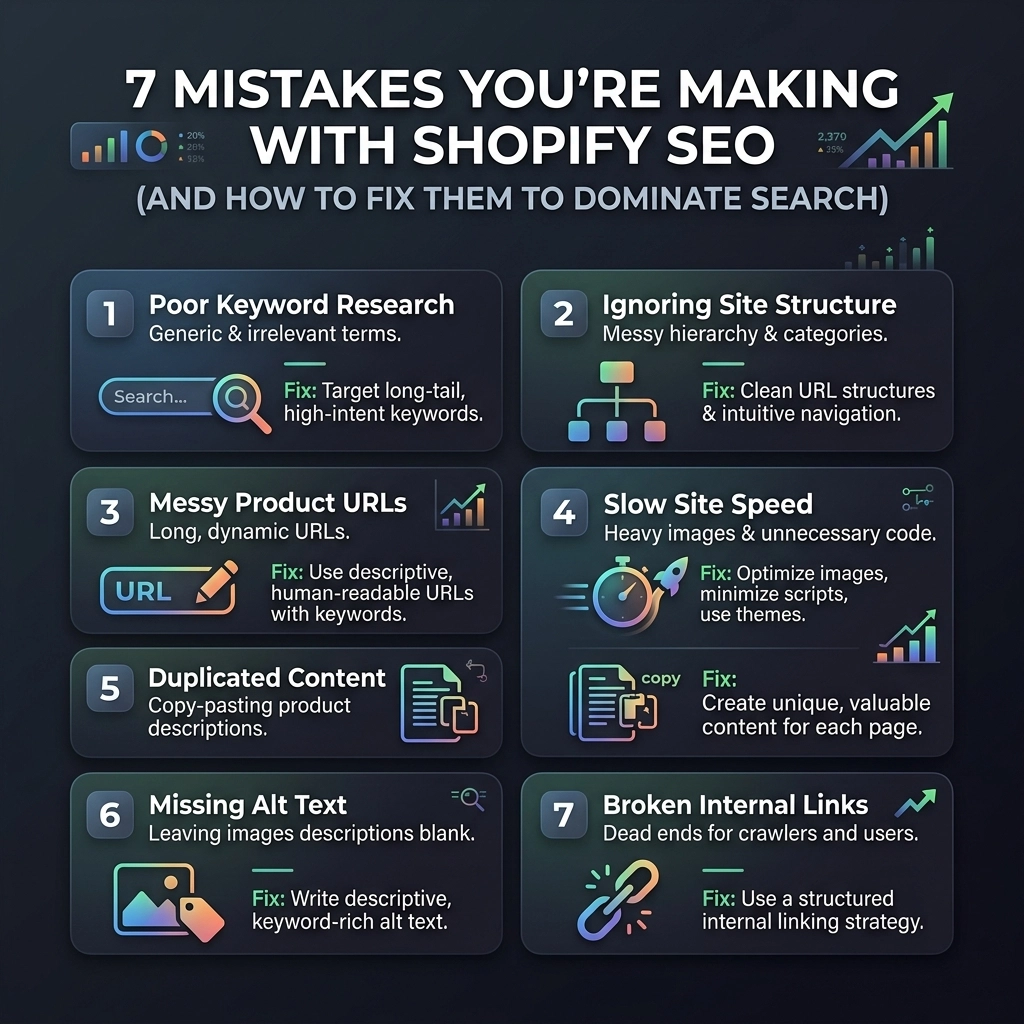
Scaling a D2C brand in 2026 isn't just about having a killer product or a flashy Instagram feed. Whether you are selling high-end skincare, sustainable streetwear, or artisanal jewelry, your growth is capped if customers can’t find you when they search. You’ve likely invested heavily in Shopify website design and social ads, but if your organic traffic is flatlining, you’re probably falling into common SEO traps that are unique to the Shopify ecosystem.
Shopify is a powerhouse for commerce, but it has specific "quirks" that can hinder your visibility if you don’t know how to manage them. In this guide, we are going deep into the seven most common mistakes fashion and beauty brands make on Shopify and, more importantly, how you can fix them to dominate the search results.
Start small, stay creative, and remember: SEO is a marathon, not a sprint. Let's get your store optimized.
1. The Duplicate Content and URL Trap
Shopify’s default architecture is incredibly user-friendly, but it has a massive flaw for SEO: it creates multiple URLs for the same product. When you add a product to a collection, Shopify often generates a URL like /collections/winter-wear/products/blue-hoodie. Meanwhile, the original product page lives at /products/blue-hoodie.
The Problem: Search engines see these as two different pages with identical content. This splits your "ranking power" (link equity) and confuses Google about which version to show in search results.
The Fix:
- Canonical Tags: Ensure your theme uses canonical tags to tell Google that the
/products/URL is the "master" version. Most modern Shopify themes do this, but it’s worth a manual check. - Unique Collection Content: Don't just list products. Add 150–200 words of unique, keyword-rich copy to the top or bottom of your collection pages.
- No-Index Filter Pages: If you use tags for filtering (like size, color, or price), use "no-index" tags to prevent these thin-content pages from being indexed.

2. Neglecting Page Speed (The "App Overload" Syndrome)
In the beauty and fashion world, visuals are everything. You want high-res videos and stunning 4K imagery. However, if your site takes five seconds to load, your bounce rate will skyrocket, and Google will push you down the rankings. Often, the culprit isn't just the images: it's the 20+ apps you've installed for "functionality."
The Problem: Every app you add to your Shopify store inserts a snippet of JavaScript. Even if you "delete" the app, the ghost code often remains, slowing down your Shopify website design.
The Fix:
- Audit Your Apps: Go through your installed apps. If you haven't used it in a month, delete it.
- Image Compression: Use tools to compress your product images to under 200KB without losing quality. WebP format is your best friend in 2026.
- Lazy Loading: Implement lazy loading so that images only load as the user scrolls down the page.
- Theme Choice: If you’re rebuilding, choose a "Headless" approach or an ultra-lightweight theme optimized for the Online Store 2.0 framework.
Pro Tip: Use Google PageSpeed Insights specifically on your mobile product pages. That is where most of your D2C traffic lives.
3. Targeting Broad Keywords Instead of Long-Tail Intent
If you’re a new jewelry brand and you’re trying to rank for "gold rings," you’re fighting an uphill battle against giants like Tiffany or Etsy. Many store owners make the mistake of being too generic with their keyword strategy.
The Problem: High-volume keywords are highly competitive and often have low conversion rates because the "intent" is too broad.
The Fix:
- Go Long-Tail: Instead of "summer dress," target "sustainable linen midi dress for beach weddings."
- Niche-Specific Terms: For beauty brands, target specific concerns like "vegan serum for hyperpigmentation" or "cruelty-free waterproof mascara."
- User Intent: Use tools to find "questions" people ask about your products and answer them in your blog or FAQ sections.
4. Generic or Automated Meta Tags
When you upload 50 new SKUs, it’s tempting to let Shopify auto-generate your Meta Titles and Descriptions. Usually, this results in something like: "Blue Silk Scarf – Brand Name."
The Problem: Your meta description is your "ad" in the search results. If it’s generic, your Click-Through Rate (CTR) will be low. Even if you rank #1, nobody will click if the description doesn't entice them.
The Fix:
- Write for Humans: Include a value proposition (e.g., "Free shipping," "Handmade in Italy," "100% Organic").
- Include Keywords Naturally: Ensure your primary keyword is near the beginning of the title.
- Unique Descriptions: Every single product needs a custom meta description. Never ever think of giving up on this: it’s the low-hanging fruit of SEO.

5. Weak Internal Linking Structure
Internal links help Google understand the relationship between your pages. Many Shopify stores rely solely on the main navigation menu, leaving deep product pages as "orphans" that are hard for search bots to find.
The Problem: If a page isn't linked to from other pages on your site, it loses authority and takes longer to get indexed.
The Fix:
- Breadcrumb Navigation: This is essential for both UX and SEO. It helps users navigate back to categories and helps Google understand your site hierarchy.
- "Related Products" Sections: Use these to create natural links between similar items.
- Blog-to-Product Links: If you write a blog post about "Top 5 Winter Streetwear Trends," link directly to the products mentioned. This is a core part of effective Shopify SEO services.
6. Ignoring the Mobile-First Reality
As of 2026, Google almost exclusively uses the mobile version of your site for indexing and ranking. If your Shopify store looks great on a desktop but is a cluttered mess on an iPhone, your rankings will suffer.
The Problem: High-fashion brands often use complex layouts that break on smaller screens. Slow mobile load times and "fat-finger" errors (buttons too close together) lead to poor user signals.
The Fix:
- Responsive Design: Ensure your theme is truly responsive. Test it on multiple devices, not just the Chrome inspector.
- Simplify the Checkout: The mobile checkout should be as friction-less as possible.
- Prioritize Above-the-Fold: Your product name, price, and "Add to Cart" button should be visible on mobile without scrolling.

7. Overlooking Image Alt Text and On-Page Basics
In the fashion and beauty niches, Google Image Search is a massive traffic driver. Many shoppers search visually. If your images are named IMG_5678.jpg and have no alt text, you are invisible.
The Problem: Missing alt text makes your site less accessible and deprives you of ranking in image search results.
The Fix:
- Descriptive Alt Text: Instead of "Red lipstick," use "Model wearing matte crimson red lipstick for dark skin tones."
- File Naming: Rename your image files before uploading them to Shopify. Use
womens-black-leather-boots.jpginstead of generic strings. - Unique Descriptions: Stop copying the manufacturer's description. Write your own copy that highlights the benefits, the feel of the fabric, or the scent of the product.
Challenges to Keep in Mind
SEO isn't a "set it and forget it" task. You will face challenges:
- Algorithm Shifts: Google updates its criteria frequently. Stay adaptable.
- Technical Limitations: Shopify restricts access to certain files (like
robots.txtto an extent), meaning you have to work within their framework. - Content Burnout: Writing unique descriptions for 500+ products is exhausting. Use AI as a co-pilot, but always add a human touch to ensure your brand voice remains consistent.
Your Next Steps Checklist
Ready to turn your Shopify store into a search engine powerhouse? Follow these steps:
- Audit Your URLs: Identify if you have duplicate product URLs and check your canonical tags.
- Speed Test: Run your site through PageSpeed Insights and delete at least three unused apps.
- Keyword Mapping: List your top 10 products and find one long-tail keyword for each.
- Update Metadata: Rewrite the meta titles and descriptions for your top 5 selling collections.
- Image Optimization: Spend 30 minutes updating alt text for your best-selling items.
- Internal Link Check: Add three links from your blog posts to relevant product pages.
- Consult the Pros: If you're looking for professional Shopify SEO services to scale your D2C brand, reach out to experts who understand the nuances of the platform.
At Thriftizer, we specialize in helping D2C brands bridge the gap between beautiful design and technical SEO excellence. Whether you need a complete overhaul or a strategic growth plan, our team is listed in the Shopify Expert Directory and ready to help you dominate your niche.
Don't let technical errors hold your brand back. Start optimizing today, stay consistent, and watch your organic traffic scale.